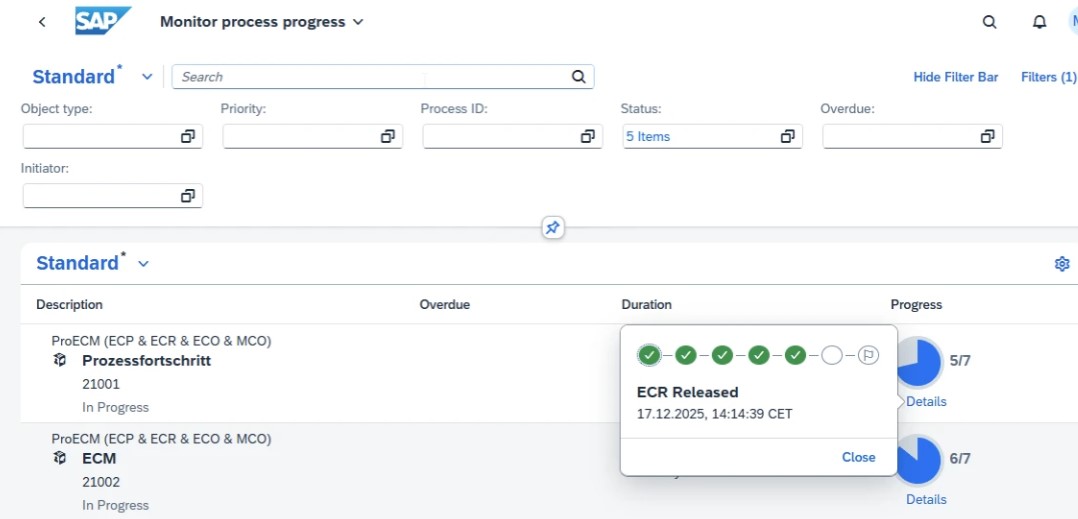
Process progress at a glance – 4 application examples for the Fiori app
Change processes relating to ECR (Engineering Change Request) and ECO (Engineering Change Order) are often complex. A lack of transparency, unclear responsibilities, and delayed approvals quickly lead to bottlenecks.
The SAP Fiori app “Monitor Process Progress” from ProNovia helps companies manage ECR and ECO processes in a transparent, efficient, and traceable manner.
The following four application examples show typical use cases.
Application example 1: Transparently track the process status of ECRs and ECOS
Many companies do not have a central view of the current status of change processes. The Fiori app visualizes each process step along a clearly structured process chain.
The following can be seen:
-
Current status of ECR and ECO changes
-
Completed, ongoing, and overdue steps
-
currently responsible roles or persons
This allows departments and process owners to keep track of ECR and ECO process progress at all times.
Application example 2: Identifying bottlenecks and overdue changes at an early stage
Delays in change processes have a direct impact on deadlines, costs, and product quality. The app highlights critical issues at an early stage.
Typical questions:
-
Which ECRs or ECOs are overdue?
-
Which changes have high or very high priority?
-
At which process step do delays occur?
With this information, those responsible can take targeted action and minimize risks in engineering change management.
Application example 3: Management cockpit for ECR and ECO processes
Process owners and managers need a compact overview of all relevant processes. With flexible filters – e.g. by status, priority, due date, or object type – an individual Fiori cockpit can be created.
The result:
-
Clear display of all critical ECRs and ECOs
-
Quick access to relevant information
-
Drill-down to detail and sub-process level
This ensures that decision-makers remain capable of acting at all times.
Application example 4: Clear process visualization for teams and new employees
Complex change processes are often difficult for new team members or project participants to understand. The app visually displays the entire process—from the submission of an ECR to analysis and evaluation to the approval of an ECO.
This makes it clear:
-
Which process steps have already been completed
-
Where the change process currently stands
-
Which steps follow next
This facilitates training, reduces queries, and supports a common understanding of the process.
Conclusion: Transparency creates speed
With the SAP Fiori app “Monitor Process Progress” you can keep track of ECR and ECO changes at all times. Bottlenecks are identified early on, approvals are accelerated, and responsibilities are clearly assigned.
Your advantages at a glance:
- Transparent process status
Every step in the ECR and ECO process is clearly traceable
- Early bottleneck detection
Overdue or critical changes are immediately visible
- Efficient decision-making
Management cockpits with relevant key figures and filters
- Better process understanding
Clear visualization for teams, project managers, and new employees